Engro Humsafar
Angular product for Engro Fertilizers: dealer orders, payments, and shipments, plus admin setup for users, roles, and SAP reports.
- Full-Stack Developer
- Feb 2025 – present
- Fertilizer dealer operations
- Ongoing
- Engro Fertilizers, via MT Pixels
Overview
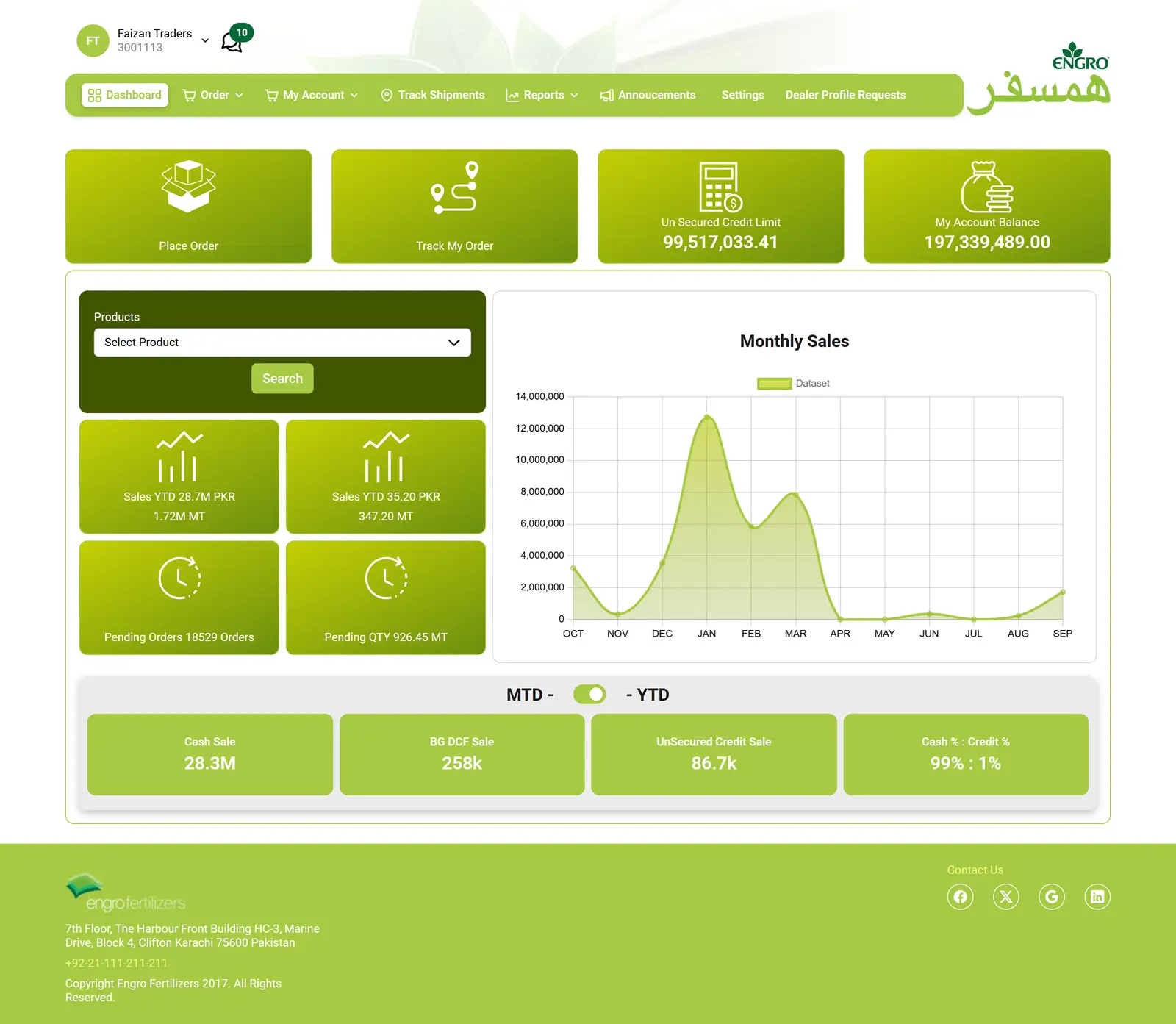
Engro Humsafar is a private Angular product for Engro Fertilizers, still in progress. Dealers and field employees place orders, follow payment and warehouse pickup, and track shipments. Admins manage users, dealers, roles, product and warehouse setup, and reports linked to SAP, Engro's enterprise system. A Payer (the dealer), Regional Sales Manager, Trucker, Logistic, or Warehouse Incharge moves an order. The screens shown are that order flow.
Context
Built at MT Pixels for Engro Fertilizers. Still in progress. Field roles are Payer (the dealer), Regional Sales Manager, Trucker, Logistic, and Warehouse Incharge. Admins handle users, setup, and SAP-linked reports. There is no public URL.
Problem
Five field roles have to move the same order, and five payment types change what happens after approval, without five copies of the order flow. Admins still have to set up the users, products, warehouses, and SAP reports that operation depends on.
- Private. Dealers and field employees place and move orders. Admins handle users, setup, and reports.
- Five field roles: Payer, Regional Sales Manager, Trucker, Logistic, and Warehouse Incharge.
- A dealer signs in, accepts a disclaimer, and in some cases selects a payer before ordering.
- Five order types: Cash, Bank Guarantee (a bank promises to pay), DCF, TCI, and Unsecured (credit without that guarantee).
- Ongoing since February 2025.
My role
I built Engro Humsafar: the order flow, payment, authority letters, shipments, and dealer reports, and the admin setup for users, roles, warehouses, and SAP reports.
- Orders, payment, authority letters (documents that authorize warehouse collection), shipments, profile, and payer selection
- Disclaimer and payer selection before an order can be placed
- Dealer reports for payment, pending orders, certificates, bank guarantees, and SAP tracking
- Admin sign-in, users, dealers, roles, and permissions
- Products, banks, warehouses, pricing, the sales hierarchy, advertisements, and notification settings
- Reports for orders, payments, dealers, and SAP
- One order flow that follows the payment type through approval, pickup, and shipment
Approach
Payment type is stored on the order. Cash, Bank Guarantee, DCF, TCI, and Unsecured change pickup, credit, and which role acts next. Admin setup covers the users, warehouses, pricing, and SAP reports around that same operation.
Key decisions
Field roles share one order flow. Admins work on users, setup, and SAP reports.
- A dealer placing an order and an admin maintaining warehouses or a SAP report are different jobs on the same operation.
- The order path has gates for the dealer, and setup screens the dealer does not use.
- Payer, Regional Sales Manager, Trucker, Logistic, and Warehouse Incharge move the order. Admins manage users, setup, and the reports.
One order flow serves five payment types. The type travels with the order.
- Cash, Bank Guarantee, DCF, TCI, and Unsecured each change pickup, credit, and what that role can do after approval.
- The dealer passes gates before the first product line: a disclaimer, and a payer when one is required. After approval, the type still changes the path.
- Warehouse pickup and shipment follow the payment type on that order, instead of a separate flow per type.
Solution
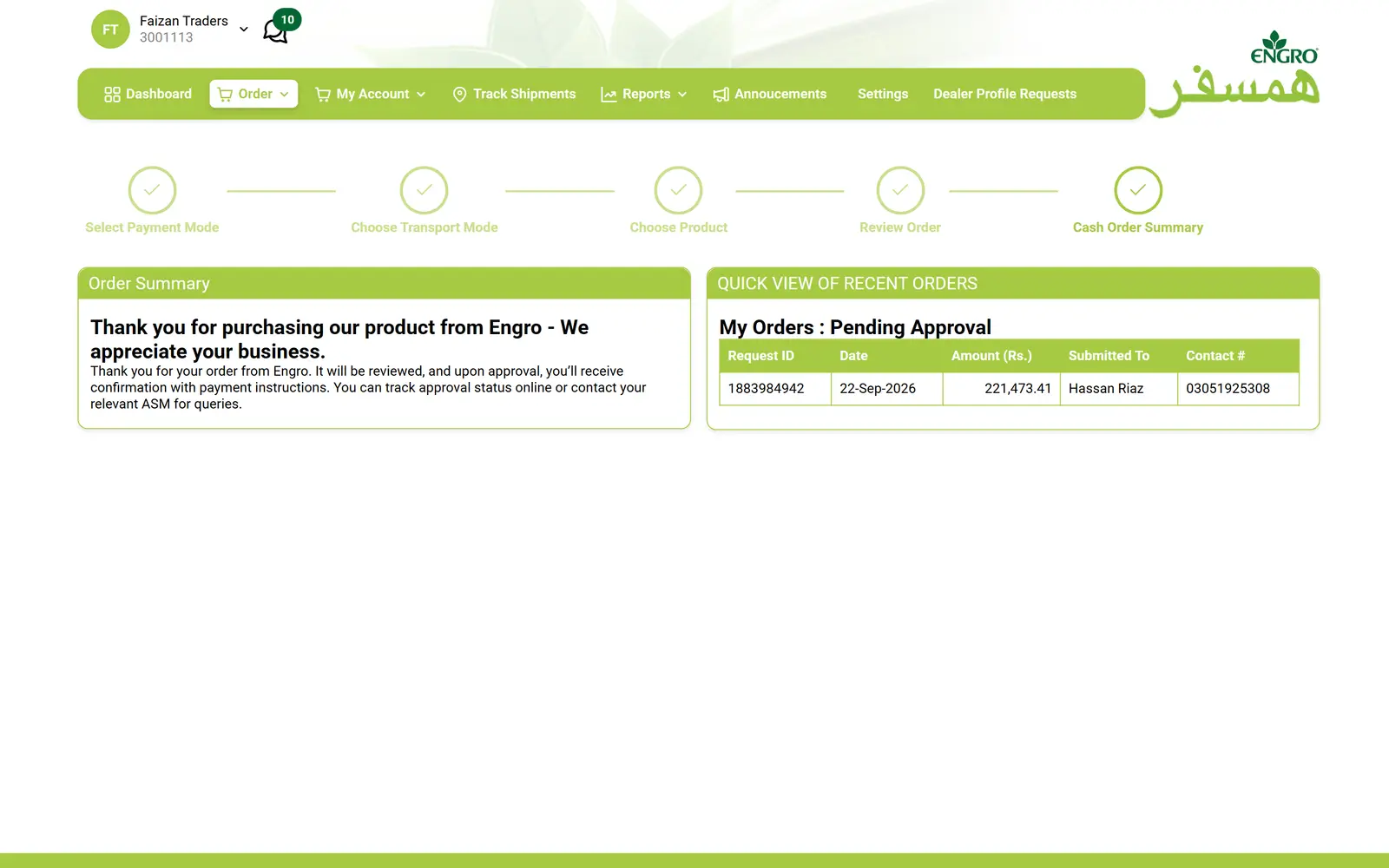
A dealer reaches a new order only after the disclaimer and, when required, a payer. The summary step shows payment, transport, and products for that type. The order screenshot is a cash order. Admins manage users, dealers, roles, products, banks, warehouses, pricing, the sales hierarchy, advertisements, notifications, and SAP-linked reports.
Methods and technology
- 01Payment type stored on the order and read after approval
- 02Disclaimer and payer selection before the first product line
- 03Admin setup for users, warehouses, and SAP-linked reports
- 01Angular
- 02TypeScript
- 03RxJS
- 04PrimeNG
- 05PrimeFlex
- 06Chart.js
- 07REST API client
Scope
- Five roles on the order: Payer, Regional Sales Manager, Trucker, Logistic, and Warehouse Incharge.
- Five order types on one flow: Cash, Bank Guarantee, DCF, TCI, and Unsecured.
- Users, dealers, roles, products, warehouses, pricing, the sales hierarchy, and SAP-linked reports.